Showing posts with label on. Show all posts

Monday, June 27, 2016

Upload Form PHP Script A PHP Script Which Will Enable You To Upload Files On Your Site

A very simple php script.Simple file upload form for your site.

Features:
  • Limit file types available for upload
  • Maximum file size validation
  • Can rename file after upload to avoid URL guessing
  • Log of uploads can be saved in MySql database. Log includes Filename, file size, IP of the user, date of upload
 Download Upload Form PHP Script

Sunday, June 26, 2016

Creating and Extracting ZIP on the fly

If you want to create  or extract zip files on-the-fly you can use pclzip class. The class can be downloaded from phpclass.org or you can download here (including an example script 33kb!!). You can change the source or destination folder.


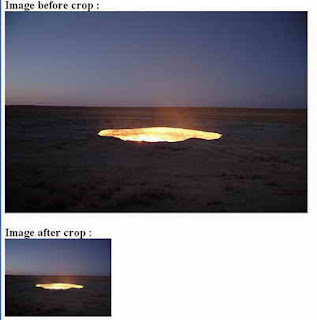
Cropping Image On The Fly

Here is php script for cropping image on the fly:


<?php

// set width, height, source file, file type, destination file

function cropImage($nw, $nh, $source, $stype, $dest) {

$size = getimagesize($source); // get size

$w = $size[0];

$h = $size[1];


switch($stype) { // image format

case gif:

$simg = imagecreatefromgif($source);

break;

case jpg:

$simg = imagecreatefromjpeg($source);

break;

case png:

$simg = imagecreatefrompng($source);

break;

}


$dimg = imagecreatetruecolor($nw, $nh); // create new image

$wm = $w/$nw;

$hm = $h/$nh;

$h_height = $nh/2;

$w_height = $nw/2;

if($w> $h) {

$adjusted_width = $w / $hm;

$half_width = $adjusted_width / 2;

$int_width = $half_width - $w_height;

imagecopyresampled($dimg,$simg,-$int_width,0,0,0,$adjusted_width,$nh,$w,$h);

} elseif(($w <$h) || ($w == $h)) {

$adjusted_height = $h / $wm;

$half_height = $adjusted_height / 2;

$int_height = $half_height - $h_height;

imagecopyresampled($dimg,$simg,0,-$int_height,0,0,$nw,$adjusted_height,$w,$h);

} else {

imagecopyresampled($dimg,$simg,0,0,0,0,$nw,$nh,$w,$h);

}

imagejpeg($dimg,$dest,100);

}

$image_ori = "image_ori.jpg";

$image_crop = "image_crop.jpg";

// run crop function

// width, height, image_ori, image format, image_crop

cropImage(225, 165, "$image_ori", jpg, "$image_crop");


print "<h2>Image before crop : <br> <img src=$image_ori> <br><br>";

print "Image after crop : <br> <img src=$image_crop>";

?>


Monday, June 13, 2016

Update Multiple Records Based On Radio Buttons Using FOR EACH

Today I will share a code snippet which will enable you to update multiple records based on radio buttons selection.

Consider this scenario:

Players are applying to play for a football team. There are more players than there are places, so some will get to play for the First team, some for the B team, some will be in the Reserves, and some will not get selected at all.

If you want to be able to pull up all players and assign their application result in the database in one update process.

Now you can do it using FOR EACH as shown in the snippet below:


foreach ($_POST[result] as $id => $result) {

$results[$result][] = $id;

}

$query = "UPDATE tablename SET result = CASE ";

foreach ($results as $res => $ids) {

$query .= sprintf("WHEN id IN (%s) THEN %s ", join(,, $ids), $res);

}

$query .= END;


Hope php script can guide you in the right direction.

Enjoy!

Wednesday, June 8, 2016

Thumbnail and Watermark On The Fly

Sometimes we may want to create thumbnails and/or watermark on-the-fly for images on our web sites instead of creating offline by using some tools or image editors. We want to generate it automatically from our php scripts. Thus, we can use thumbnail class made by Emilio Rodriguez  and we can download it from phpclass.org or from here (including an example file 7kb).

/**
*This is a class that can process an image on the fly by either generate a thumbnail, apply an watermark to the image, or resize it.
*
* The processed image can either be displayed in a page, saved to a file, or returned to a variable.
* It requires the PHP with support for GD library extension in either version 1 or 2. If the GD library version 2 is available it the class can manipulate the images in true color, thus providing better quality of the results of resized images.
* Features description:
* - Thumbnail: normal thumbnail generation
* - Watermark: Text or image in PNG format. Suport multiples positions.
* - Auto-fitting: adjust the dimensions so that the resized image aspect is not distorted
* - Scaling: enlarge and shrink the image
* - Format: both JPEG and PNG are supported, but the watermark image can only be in PNG format as it needs to be transparent
* - Autodetect the GD library version supported by PHP
* - Calculate quality factor for a specific file size in JPEG format.
* - Suport bicubic resample algorithm
* - Tested: PHP 4 valid
*
* @package Thumbnail and Watermark Class
* @author Emilio Rodriguez
* @version 1.48 <2005/07/18>
* @copyright GNU General Public License (GPL)
**/


Tuesday, May 31, 2016

Gallery Generator PHP Script Generate Picture Galleries On Your Web Site

Gallery Generator is the perfect and easy solution to generate picture galleries on your web site. It is all template based so just upload your templates and when you choose a template the script will automatically put the images where they are supposed to go.

Requirements

  •     PHP 5+ -http://www.php.net
  •     GD Library – http://www.libgd.org

Installation
  •     Open config.inc in the main folder and modify the settings to your liking
  •     Modify templates to suit your needs / design in the templates directory
  •     You may add new templates to the directory (they will show up automatically in the admin form)
  •     Upload to your server
  •     CHMOD the galleries directory and give it write access (this is where your galleries will be created)
  •     NOTE: You may want to limit access to your script directory by using .htaccess or other methods. If you do this however, make sure when you change settings in config.inc that you don’t place your gallery pages inside of this protected area unless you want it that way.
Download Gallery Generator PHP Script

Wednesday, May 25, 2016

Simple Member PHP Script Add Protective Area On Your Website

Simple Member allows you to put up that much needed protective area on your web site where you don’t want anyone snooping without first signing up. This is a real simple membership script written in PHP 5+ that requires MySQL 5+ to run it on your website.

Requirements

    PHP 5+ -http://www.php.net
    MySQL 5+ – http://www.mysql.com
MySQL Database Setup

    Open sql.txt using any text editor. (located in the main Simple Member folder)
    Paste the contents into a tool that can execute SQL commands for your MySQL DB

Installation

    Follow the MySQL Database Setup Before Continuing
    Open main.php with any text editor in the root folder and modify the settings for your server
    Upload to your server

How to Use Simple Member
    At this time there are no admin utilities to view, edit, remove your members, etc.
    The login / add member php script is located at http://domain/to/main/path/index.php
    Your members area would be located in member.php … so this is where you would put content that you want only your members to see. You may copy member.php into a new file to add multiple member restricted pages. Look for the MEMBER CONTENT GOES HERE comment.

Download Simple Member PHP Script

Sunday, May 22, 2016

FPDF PHP Script To Create PDF On The Fly

FPDF is a PHP class which allows to generate PDF files with pure PHP, that is to say without using the PDFlib library. F from FPDF stands for Free: you may use it for any kind of usage and modify it to suit your needs.

FPDF has other advantages: high level functions. Here is a list of its main features:

  •     Choice of measure unit, page format and margins
  •     Page header and footer management
  •     Automatic page break
  •     Automatic line break and text justification
  •     Image support (JPEG, PNG and GIF)
  •     Colors
  •     Links
  •     TrueType, Type1 and encoding support
  •     Page compression
FPDF PHP Script requires no extension (except zlib to activate compression and GD for GIF support). It works with PHP 4 and PHP 5 (the latest version requires at least PHP 4.3.10).

 An Example...

Lets start with the classic example:

<?php
require(fpdf.php);

$pdf = new FPDF();
$pdf->AddPage();
$pdf->SetFont(Arial,B,16);
$pdf->Cell(40,10,Hello World!);
$pdf->Output();
?>


After including the library file, we create an FPDF object. The FPDF() constructor is used here with the default values: pages are in A4 portrait and the unit of measure is millimeter. It could have been specified explicitly with:

$pdf = new FPDF(P,mm,A4);

Its possible to use landscape (L), other page sizes (such as Letter and Legal) and units (pt, cm, in).

Theres no page at the moment, so we have to add one with AddPage(). The origin is at the upper-left corner and the current position is by default set at 1 cm from the borders; the margins can be changed with SetMargins().

Before we can print text, its mandatory to select a font with SetFont(), otherwise the document would be invalid. We choose Arial bold 16:


$pdf->SetFont(Arial,B,16);

We could have specified italics with I, underlined with U or a regular font with an empty string (or any combination). Note that the font size is given in points, not millimeters (or another user unit); its the only exception. The other standard fonts are Times, Courier, Symbol and ZapfDingbats.

We can now print a cell with Cell(). A cell is a rectangular area, possibly framed, which contains a line of text. It is output at the current position. We specify its dimensions, its text (centered or aligned), if borders should be drawn, and where the current position moves after it (to the right, below or to the beginning of the next line). To add a frame, we would do this:


$pdf->Cell(40,10,Hello World !,1);

 To add a new cell next to it with centered text and go to the next line, we would do:


$pdf->Cell(60,10,Powered by FPDF.,0,1,C);

Remark: the line break can also be done with Ln(). This method additionnaly allows to specify the height of the break.

Finally, the document is closed and sent to the browser with Output(). We could have saved it to a file by passing the desired file name.

Caution: in case when the PDF is sent to the browser, nothing else must be output by the script, neither before nor after (no HTML, not even a space or a carriage return). If you send something before, you will get the error message: "Some data has already been output, cant send PDF file". If you send something after, the document might not display.


Download PHP Script (FPDF) To Create PDF 

 If you like this script, then consider subscribing to our blog below so that we can send you all updates from our blog directly in your email.

Thanks for taking interest in our PHP blog.

Enjoy!


Wednesday, May 11, 2016

Change Detect and Alert PHP Script Detect Filesystem Changes On A Webserver

Purpose: detect filesystem changes on a (web)server and send list of changed or added files via email. Can send a kind of alert as SMS if your mobile network operator supports email to sms gateway. Tip: see Wikipedia for "List of SMS gateways".
Usage:
  • Change script settings (in file) according to your needs
  • Upload to your (web)server
  • Setup cron job to run it periodically;
    - via PHP "php -q /home/serverpath/script/change-detect-alert.php"
    - via cURL "curl http://www.example.com/path/to/change-detect-alert.php"
Notes: php script checks file size only, will possibly add date and contents comparison later if needed; invoking via PHP is preferred; you may need to specify absolute path to php or curl

Requirements: Change Detect and Alert is a script which is supposed to be run on a server with PHP and SQLite3 installed.

Download Change Detect and Alert PHP Script

Friday, May 6, 2016

cPanel Email Forwarder Creator Create Email Forwarders On cPanel Based Hosting In PHP

Create email forwarders on cPanel based hosting. No need to login to cPanel. Provide cPanel login and password once, and use this script each time you need to create email forwarder.
Can be run in either way:
- Parameters passed via URL (see example below)
- If no parameters passed via URL then will show email forwarder parameters entry form

Usage:
  • Update script with your cPanel login, password, skin (once)
  • When running script to create email forwarder, provide following data:
    • Username - create email forwarder for this username(sample: john)
    • Domain - create email forwarder for this domain (sample: mysite.com)
    • Redirect to - forward emails to address (sample: jimm@site2.com) 
Sample parameters passing via url: 

cpanel_email_forwarder.php?euser=john&edomain=site1.com&eforward=johny@site2.com 

Download cPanel Email Forwarder Creator PHP Script

Monday, May 2, 2016

Higher Secondary Schools will close on March 31

Higher Secondary Schools in the State will close on March 31 for summer vacation.
The evaluation of Higher Secondary March-2015 answer papers will begin on April 6.
Click the below link for downloading the circular published by DHSE.

Higher Secondary Schools will close on March 31 for Summer Vacation. Circular dtd  30.01.2015

Wednesday, April 13, 2016

Ask Your Doubts on HSEManager 7 0

Update: Help file for HSEMANAGER patch installation. Click here.

If you have any query regarding installation, data entry and report creation of HSE Manager Software then feel free to ask. HSE Manager Software Developer Sri.Sajan Mathew (HSST Computer Science, St.Joseph HSS, Karimannoor, Idukki) is  here to solve it out! Your question along with the answers will be displayed below. 

Please visit this blog  to get the reply to your question. Be sure to check back and watch response.


Problem 1 : Security Error
(Click the Image to Enlarge)
Solution:Select Open Option

Problem 2 : HSE Manager shows an error #errror under the HSEMANAGER Title

Solution:The Folder is not unzipped/extracted.It is in the readonly mode.

Unzip the folder to D drive. 

If you have any questions feel free to comment them.
 

Wednesday, March 30, 2016

Guidelines on School Study Tours

Kerala School Study Tour
DHSE has issued orders imposing some restrictions on study tours in order to make them safe and secure. 

To begin with, the PTA executive should discuss in advance and take a decision on the place selected for the tour, journey programme and the place of stay.

School Tours can be conducted only during October, November and December. The peculiarities of the place and safety aspects should be looked into and advance written permission of the authorities(RDD) should be obtained. Click the below links to download the full text of the previous orders.

Previous Circulars
School Study Tour : Guidelines from RDD TVM dtd 15/10/15
School Study Tour : Guidelines from DHSE dtd 15/11/12
School Study Tour : Guidelines from DHSE dtd 28/04/12
School Study Tour : Guidelines from DPI dtd 27/12/2013
School Study Tour : Guidelines from DPI dtd 02/03/2007


Sunday, March 27, 2016

MySQL Installation on Windows PC

MySQL Community Edition is a freely downloadable version of the worlds most popular open source database that is supported by an active community of open source developers and enthusiasts.

Log into the computer as an administrator. This will give you administrator rights, which will make the installation smoother. Note that, once installed, the program doesn’t need to be run as an administrator.

To properly install and configure MySQL on your Windows PC, follow these instructions.

Step 1: Download the free MySQL Server Community Edition from MySQL Download Page. Be sure to download a version that includes a Windows Installer. Save the file on your Windows Desktop. If you’re not sure which version to select, download MySQL Installer for Windows from our mirror Link.


Download MySQL 5.1 ((35 MB)

Step 2: Double-click the downloaded file mysql-essential-5.1.30-win32 .This will initialize the setup process.
Step 3: Click Next. This begins the setup.

Step 4: Click Custom > Next. This will enable you to specify where you want to install MySQL.
Step 5: Change the default folder and drive.
Step 6: Click Install. Wait while the program self-installs.
Step 7: Click Next in this Enterprise Edition Alert
Step 8: Your new dialogue box should say Wizard Completed. Leave the check box "Configure the MySQL Server Now" checked and click Finish.
.
Step 9: Check the start menu for the item " MySQL Server Instance Config Wizard " and click.This will initialize the configuration setup
.
Step 10: The configuration wizard will allow you to configure the MySQL Server 5.1. To continue click Next.
Step 11: Check "Standard Configuration " and then click Next. This is the default configuration and is recommended for most users.
Step 12: Make sure "Install As Windows Service" and "Include Bin Directory on the Windows Path" are checked, then click Next.
Step 13: Create a root password. Type in what you want your root password. Then click next.
Step 14: Click Execute. This will start the MySQL server. After MySQL has done its thing, click Finish.
Step 14: Press Finish to Close the Wizard
Step 15: Check Start menu for the item "MySQL Command Line Client" and click.
Step 16: This will open a command window asking you for a password.Enter your root password and hit Enter. This should initiate the program
Step 17: Before executing SQL Commands do the folowing on mysql prompt(mysql>) . Type "Connect mysql;" in SQL prompt.

Step 18: Only after connecting to a database you can execute SQL Queries.
Check the following sample Queries....

Create table student(roll int primary key,name char(20));


Insert into student values(1,HSSLiVE);


Select * from student;


Read more : PHP-mySQL Installation in Ubuntu

Monday, February 15, 2016

10 Special Tips on Any Competitive Job Exam in Bangladesh

There are so many competitive exams take place in Bangladesh every year. The job sector varies, but the criteria for getting the job is the same. A person who wants to get the job can easily find the way with 10 special tips which will help on any competitive exam in Bangladesh. They are given below:


1. First of all the previous question of the job should be collected. There is no alternative to solve question while taking preparation. The fundamental structure of the exams is the same. This is the first and foremost special tips to be followed.

2. Taking all the possible information about the job and job sector is also a special tips. A job with full security will not only ensure about the perfect preparation, but also give encourage to become a candidate.

3. General Knowledge is a must for any competitive exam in Bangladesh. So the tips is to keep abreast with the running and moving world. Current affairs and Bangladeshi affairs are sometimes very important. There is a huge amount of question on the basis of this topic.

4. Bengali literature is a vast field of knowledge. Any competitive exam in Bangladesh contains the questions on this. When you are taking preparation to attend an exam, the special tips will be to go through the names and information about the literature and writers. This will help to answer questions based on Bengali grammar and literature.

5. Writing English with any topic is very important for competitive exam in Bangladesh. It is a process to know about the creativity and English efficiency of a candidate. Practicing English freehand writing more and more can be a key tool for you. The vocabulary and grammars will seem easier then.

6. Solving secondary math problems not only help to get the answers correct, but also refresh the mind of the candidate. Usually the questions are relevant with secondary and higher secondary level. So, books of this standard have to be collected and solve them regularly.

7. Studying various kinds of books will improve the common sense and attitude of a candidate of any competitive exam in Bangladesh. Analytical question often creates problems for answering. When a candidate studies those materials, he can experience about those.

8. Facing exam should be enjoyable. Taking every question as an interesting game is a special tips on any competitive exam in Bangladesh. This will increase the enjoyment of the study and style of answer.

9. There should be a routine for a candidate of any competitive exam in Bangladesh. The subjects should be given same priorities and care. Time management is very important for any preparation.

10. Confident, informative and well-mannered personality is very helpful to get a good score in any competitive exam in Bangladesh. Communicate with the previous successful person of the sector. He can consult with the best advices. The consultancy is very helpful while taking decision on that particular job.


Upward 10 special tips should be strictly followed in order to get best output from an examinees practices. We hope, such tips from Bangla Books PDF will ensure a good result in any competitive exam in Bangladesh.

Thursday, February 11, 2016

10 Special Tips on Bank Job Examination For Bangladeshi Banks

The examination taken to attend on a bank job or to become an appointee as an employee of a bank which is often called as Bank job examination, is very important to get a job in any Bangladeshi bank. Applicants must be aware of the examination process. Here are 10 special tips on Bank Job examination. They are given below:


1. An applicant must fulfill the requirements for being able for the bank job. Applying through online and keeping updated information are two special tips for this reason.

2. Reading by a routine is much important. A routine which has full emphasis on every subject is helpful for getting prepared towards the bank job information. All subjects must be divided into the same time and concentration. The day and night time should be combined and managed. Those will improve the study quality of an applicant for the examination.

3. Reading newspapers is another special tips for being up to date. This will allow the applicant to be acknowledged about the recent activities throughout the world. Some books and magazines are also effective in getting good score in the examination.

4. Practicing math of secondary level and commerce, will help to solve math problems. Again, there are some questions which can be solved by calculator, should be practiced. It will not only save time but also ensure the perfection of the math problems.

5. English rules and regulations should be practiced and memorized. An applicant with some skills in English is more preferable than others who are weak in this language. Bank job examination contains many questions involving this type. Those questions can be answered with proper confidence. The reading materials for English can be collected from the market.

6. Both grammatical and memorized questions are given in the Bengali portion of the bank job examination. So the special tips will be to read more and more Bengali literature and writers. This information can be found from the books of renowned writers.

7. General knowledge is a hard nut to crack. Keeping abreast with the world will be more comfortable when you study a book with information. Informative books are like “NotunBishwa” or “AjkerBishwa” is very helpful. Memorizing currency of the nations and write them properly is very important as a special tips.

8. Mental preparation is much important to take part in Bank job information. Managing the pressure and study regularly will give relief from those stresses. In examination hall, every answer should be written in confidence.

9. Viva board or interview board is the last phase of Bank job examination. A good communication skill is required to get passed in there. The intention will be to accept the job as an offer from the bank. The person who sits in front of the desk, are much friendlier.

10. Acquiring knowledge and enabling reading habit are very important and special tips for this examination. The tips will be to gather subject knowledge as far as it demands. Again, there are some problems for ages. Just need to ignore them.

Those 10 special tips on Bank job examination will work only by determination and hard work. So wish you luck as an applicant for a bank job.