Showing posts with label fly. Show all posts

Sunday, June 26, 2016

Creating and Extracting ZIP on the fly

If you want to create  or extract zip files on-the-fly you can use pclzip class. The class can be downloaded from phpclass.org or you can download here (including an example script 33kb!!). You can change the source or destination folder.


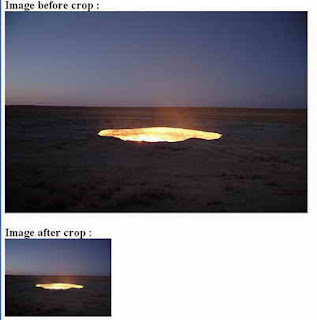
Cropping Image On The Fly

Here is php script for cropping image on the fly:


<?php

// set width, height, source file, file type, destination file

function cropImage($nw, $nh, $source, $stype, $dest) {

$size = getimagesize($source); // get size

$w = $size[0];

$h = $size[1];


switch($stype) { // image format

case gif:

$simg = imagecreatefromgif($source);

break;

case jpg:

$simg = imagecreatefromjpeg($source);

break;

case png:

$simg = imagecreatefrompng($source);

break;

}


$dimg = imagecreatetruecolor($nw, $nh); // create new image

$wm = $w/$nw;

$hm = $h/$nh;

$h_height = $nh/2;

$w_height = $nw/2;

if($w> $h) {

$adjusted_width = $w / $hm;

$half_width = $adjusted_width / 2;

$int_width = $half_width - $w_height;

imagecopyresampled($dimg,$simg,-$int_width,0,0,0,$adjusted_width,$nh,$w,$h);

} elseif(($w <$h) || ($w == $h)) {

$adjusted_height = $h / $wm;

$half_height = $adjusted_height / 2;

$int_height = $half_height - $h_height;

imagecopyresampled($dimg,$simg,0,-$int_height,0,0,$nw,$adjusted_height,$w,$h);

} else {

imagecopyresampled($dimg,$simg,0,0,0,0,$nw,$nh,$w,$h);

}

imagejpeg($dimg,$dest,100);

}

$image_ori = "image_ori.jpg";

$image_crop = "image_crop.jpg";

// run crop function

// width, height, image_ori, image format, image_crop

cropImage(225, 165, "$image_ori", jpg, "$image_crop");


print "<h2>Image before crop : <br> <img src=$image_ori> <br><br>";

print "Image after crop : <br> <img src=$image_crop>";

?>


Wednesday, June 8, 2016

Thumbnail and Watermark On The Fly

Sometimes we may want to create thumbnails and/or watermark on-the-fly for images on our web sites instead of creating offline by using some tools or image editors. We want to generate it automatically from our php scripts. Thus, we can use thumbnail class made by Emilio Rodriguez  and we can download it from phpclass.org or from here (including an example file 7kb).

/**
*This is a class that can process an image on the fly by either generate a thumbnail, apply an watermark to the image, or resize it.
*
* The processed image can either be displayed in a page, saved to a file, or returned to a variable.
* It requires the PHP with support for GD library extension in either version 1 or 2. If the GD library version 2 is available it the class can manipulate the images in true color, thus providing better quality of the results of resized images.
* Features description:
* - Thumbnail: normal thumbnail generation
* - Watermark: Text or image in PNG format. Suport multiples positions.
* - Auto-fitting: adjust the dimensions so that the resized image aspect is not distorted
* - Scaling: enlarge and shrink the image
* - Format: both JPEG and PNG are supported, but the watermark image can only be in PNG format as it needs to be transparent
* - Autodetect the GD library version supported by PHP
* - Calculate quality factor for a specific file size in JPEG format.
* - Suport bicubic resample algorithm
* - Tested: PHP 4 valid
*
* @package Thumbnail and Watermark Class
* @author Emilio Rodriguez
* @version 1.48 <2005/07/18>
* @copyright GNU General Public License (GPL)
**/


Sunday, May 22, 2016

FPDF PHP Script To Create PDF On The Fly

FPDF is a PHP class which allows to generate PDF files with pure PHP, that is to say without using the PDFlib library. F from FPDF stands for Free: you may use it for any kind of usage and modify it to suit your needs.

FPDF has other advantages: high level functions. Here is a list of its main features:

  •     Choice of measure unit, page format and margins
  •     Page header and footer management
  •     Automatic page break
  •     Automatic line break and text justification
  •     Image support (JPEG, PNG and GIF)
  •     Colors
  •     Links
  •     TrueType, Type1 and encoding support
  •     Page compression
FPDF PHP Script requires no extension (except zlib to activate compression and GD for GIF support). It works with PHP 4 and PHP 5 (the latest version requires at least PHP 4.3.10).

 An Example...

Lets start with the classic example:

<?php
require(fpdf.php);

$pdf = new FPDF();
$pdf->AddPage();
$pdf->SetFont(Arial,B,16);
$pdf->Cell(40,10,Hello World!);
$pdf->Output();
?>


After including the library file, we create an FPDF object. The FPDF() constructor is used here with the default values: pages are in A4 portrait and the unit of measure is millimeter. It could have been specified explicitly with:

$pdf = new FPDF(P,mm,A4);

Its possible to use landscape (L), other page sizes (such as Letter and Legal) and units (pt, cm, in).

Theres no page at the moment, so we have to add one with AddPage(). The origin is at the upper-left corner and the current position is by default set at 1 cm from the borders; the margins can be changed with SetMargins().

Before we can print text, its mandatory to select a font with SetFont(), otherwise the document would be invalid. We choose Arial bold 16:


$pdf->SetFont(Arial,B,16);

We could have specified italics with I, underlined with U or a regular font with an empty string (or any combination). Note that the font size is given in points, not millimeters (or another user unit); its the only exception. The other standard fonts are Times, Courier, Symbol and ZapfDingbats.

We can now print a cell with Cell(). A cell is a rectangular area, possibly framed, which contains a line of text. It is output at the current position. We specify its dimensions, its text (centered or aligned), if borders should be drawn, and where the current position moves after it (to the right, below or to the beginning of the next line). To add a frame, we would do this:


$pdf->Cell(40,10,Hello World !,1);

 To add a new cell next to it with centered text and go to the next line, we would do:


$pdf->Cell(60,10,Powered by FPDF.,0,1,C);

Remark: the line break can also be done with Ln(). This method additionnaly allows to specify the height of the break.

Finally, the document is closed and sent to the browser with Output(). We could have saved it to a file by passing the desired file name.

Caution: in case when the PDF is sent to the browser, nothing else must be output by the script, neither before nor after (no HTML, not even a space or a carriage return). If you send something before, you will get the error message: "Some data has already been output, cant send PDF file". If you send something after, the document might not display.


Download PHP Script (FPDF) To Create PDF 

 If you like this script, then consider subscribing to our blog below so that we can send you all updates from our blog directly in your email.

Thanks for taking interest in our PHP blog.

Enjoy!