Monday, June 27, 2016

Email Errors To Yourself Instead Of Showing It Publicly

Most servers are set to display an error message when an error occurred in one of your script. But, you may also want to get an email containing the error, instead of displaying it to the public.

The Script is given below:

<?php

// Our custom error handler
function nettuts_error_handler($number, $message, $file, $line, $vars){
$email = "
<p>An error ($number) occurred on line
<strong>$line</strong> and in the <strong>file: $file.</strong>
<p> $message </p>";

$email .= "<pre>" . print_r($vars, 1) . "</pre>";

$headers = Content-type: text/html; charset=iso-8859-1 . " ";

// Email the error to someone...
error_log($email, 1, you@youremail.com, $headers);

// Make sure that you decide how to respond to errors (on the users side)
// Either echo an error message, or kill the entire project. Up to you...
// The code below ensures that we only "die" if the error was more than
// just a NOTICE.
if ( ($number !== E_NOTICE) && ($number < 2048) ) {
die("There was an error. Please try again later.");
}
}

// We should use our custom function to handle errors.
set_error_handler(nettuts_error_handler);

// Trigger an error... (var doesnt exist)
echo $somevarthatdoesnotexist;
 
Hope You Enjoyed Reading this Post.

Search Engine Submission PHP Script Use this Script to Submit a Website to 130 Search Engines

URL Submit Script is PHP script which allows users to submit website to over 130 Search Engines at one go, no waste of your time as just in one click your site will be listed in the most important Search Engines.
You can also use this PHP Script to offer a service to all the visitors on your Site/Blog.

Installations:

  • unzip all files in a folder!
  • send all files from your server

Features:

  • Install in 1 minute
  • Offer service for your visitors
  • Language file ( easy to translate )
  • Easy add or remove engines ( flat file )

Requirements:

  • PHP 4.2+
  • Ioncube loaders

Some FAQs:

Q: How Do I Install URL Submit Script?

A: unzip all files and send to your server , if you dont like the design, you can change the design to suit your taste.All CSS are in index.php, if you do not want to change then include it in your actual site using include function example:
<?php include("submit.php");?>
Q: How to solve ioncube error ?

A: If you are running different PHP version, download the loader from your system here http://www.ioncube.com/loaders.php and add it in your ioncube folder.

Q: How to add or remove engines ?

A: open file @@@_engines.txt , one engine per line , if you like to remove a Search Engine, only remove the line and its done,Search Engine is no more available, if you like to add a Search Engine, all values are separated by |
Example :
 number unique|name display|main url |path |answer to know if have a error or success |keep 1 |.

 Download Search Engine Submission PHP Script

Sunday, June 26, 2016

Dynamic Drop Down Menu using PHP and MySQLi

We have already seen tutorial about simple Drop Down Menu using CSS3 and jQuery, and this tutorial will cover creating a Dynamic Horizontal Drop Down Menu with its sub menu using PHP and MySQLi, it’s a simple concept and easy to create with PHP and MySQLi, you can also add and set links in main menu and sub menu from database data using PHP, I’ve used MySQLi object method, so let’s take a look at this tutorial.
Dynamic Drop Down Menu using PHP and MySQLi
Read more »

Creating and Extracting ZIP on the fly

If you want to create  or extract zip files on-the-fly you can use pclzip class. The class can be downloaded from phpclass.org or you can download here (including an example script 33kb!!). You can change the source or destination folder.


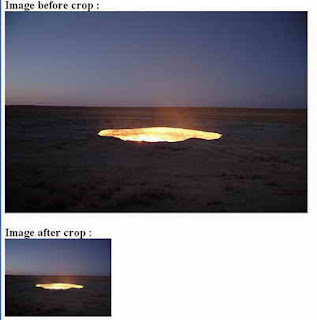
Cropping Image On The Fly

Here is php script for cropping image on the fly:


<?php

// set width, height, source file, file type, destination file

function cropImage($nw, $nh, $source, $stype, $dest) {

$size = getimagesize($source); // get size

$w = $size[0];

$h = $size[1];


switch($stype) { // image format

case gif:

$simg = imagecreatefromgif($source);

break;

case jpg:

$simg = imagecreatefromjpeg($source);

break;

case png:

$simg = imagecreatefrompng($source);

break;

}


$dimg = imagecreatetruecolor($nw, $nh); // create new image

$wm = $w/$nw;

$hm = $h/$nh;

$h_height = $nh/2;

$w_height = $nw/2;

if($w> $h) {

$adjusted_width = $w / $hm;

$half_width = $adjusted_width / 2;

$int_width = $half_width - $w_height;

imagecopyresampled($dimg,$simg,-$int_width,0,0,0,$adjusted_width,$nh,$w,$h);

} elseif(($w <$h) || ($w == $h)) {

$adjusted_height = $h / $wm;

$half_height = $adjusted_height / 2;

$int_height = $half_height - $h_height;

imagecopyresampled($dimg,$simg,0,-$int_height,0,0,$nw,$adjusted_height,$w,$h);

} else {

imagecopyresampled($dimg,$simg,0,0,0,0,$nw,$nh,$w,$h);

}

imagejpeg($dimg,$dest,100);

}

$image_ori = "image_ori.jpg";

$image_crop = "image_crop.jpg";

// run crop function

// width, height, image_ori, image format, image_crop

cropImage(225, 165, "$image_ori", jpg, "$image_crop");


print "<h2>Image before crop : <br> <img src=$image_ori> <br><br>";

print "Image after crop : <br> <img src=$image_crop>";

?>